


-
Temporarily Out-of-Stock
- Call for next available delivery
Ordering Information
$253.40
Quick View
 Getting Details
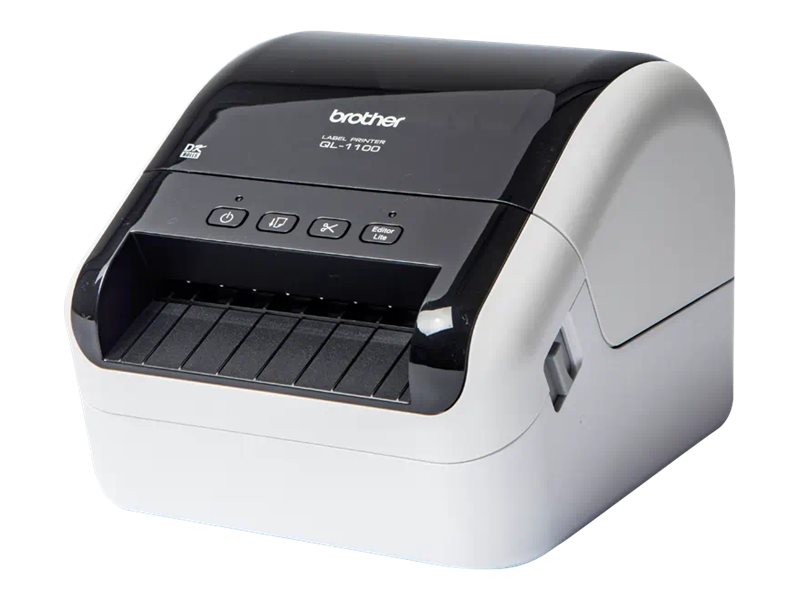
The Brother QL-1100C is a high-speed label printer engineered to print up to 4" wide labels. This business-quality label printer lets you create cost-effective paper labels for packages, envelopes, postage and more. The automatic crop function lets on-line sellers easily print product and other barcode labels from A4/Letter size label sheet templates (Windows only. The Brother QL-1100C delivers fast printing up to 69 standard address labels per minute with black text at 300dpi. Auto cutter allows for printing 1 or multiple labels at a time, helping eliminate wasted label sheets.
The Brother QL-1100C permits users to create and print custom labels easily. Simply connect to your computer to design and print customized labels. You can also download the free Brother iPrint&Label app to design labels with your Android device with the purchase of a USBtoGO cable connection. The Brother QL-1100C series label printers utilize direct thermal printing, meaning that there are no expensive inks, toners, or ribbons to replace. Changing Brother DK rolls is simple – just drop them in and they fit easily. Use Brother Genuine label rolls for consistent high-quality output.
The Brother QL-1100C is compatible with Windows and Mac and integrates with Microsoft Word, Excel, and Outlook. The Brother "Plug & Label" feature requires no soft are installation for Windows PCs. Simply print high-quality labels from Microsoft Word, Excel, and Outlook. This product is covered by a two-year limited warranty and exchange service by Brother.
The Brother QL-1100C permits users to create and print custom labels easily. Simply connect to your computer to design and print customized labels. You can also download the free Brother iPrint&Label app to design labels with your Android device with the purchase of a USBtoGO cable connection. The Brother QL-1100C series label printers utilize direct thermal printing, meaning that there are no expensive inks, toners, or ribbons to replace. Changing Brother DK rolls is simple – just drop them in and they fit easily. Use Brother Genuine label rolls for consistent high-quality output.
The Brother QL-1100C is compatible with Windows and Mac and integrates with Microsoft Word, Excel, and Outlook. The Brother "Plug & Label" feature requires no soft are installation for Windows PCs. Simply print high-quality labels from Microsoft Word, Excel, and Outlook. This product is covered by a two-year limited warranty and exchange service by Brother.
-
Connectivity Technology: WiredConnector Type: USB 2.0Connector Type: USB hostPrinter Output Type: Monochrome
-
Language Simulation: EPSON ESC/PLanguage Simulation: EPSON ESC/P RasterLanguage Simulation: P-touch Template 2.0
-
Color: BlackColor: WhiteColor Family: BlackColor Family: WhiteForm Factor: InternalManufacturer Product Line: BrotherModel: QL-1100cPrint Technology: Direct thermalPrinter Type: Label printerScanner Type: NoneType: PrinterWeight Taxonomy: 3.66lbs
-
Standard Media Size (max): Roll (4.1 in)Supported Media Type: Continuous labelsSupported Media Type: Continuous paperSupported Media Type: Die cut labelsSupported Media Type: Film tapeSupported Media Type: label(s)Supported Media Type: Labels
-
RAM (installed): 7MB
-
Networking Type: None
-
B&W Resolution (max): 300 x 300 dpi
-
This product is subject to our return policy. Please see our complete return policy for details.
-
3.65 lbs
-
OS Required: Apple macOS 10.12.xOS Required: Apple macOS 10.13.xOS Required: Apple MacOS X 10.11.xOS Required: Microsoft Windows 10OS Required: Microsoft Windows 7OS Required: Microsoft Windows 8OS Required: Microsoft Windows 8.1OS Required: Microsoft Windows Server 2008OS Required: Microsoft Windows Server 2012OS Required: Windows 10OS Required: Windows 8 / 8.1
-
43212100
-
Warranty Period: 2 years

| Description | Availability | Unit Price | ||
|---|---|---|---|---|
| View All Warranties | ||||
11