
Microsoft 365 Copilot
Turn Microsoft 365 Copilot into Measurable Business Impact
Copilot in Microsoft 365 helps your workforce move from task execution to strategic impact, summarizing complex data in seconds, generating high-quality content instantly, and streamlining workflows across Outlook, Excel, Teams, and more.
Drive measurable business results with Connection's expertise across licensing, governance and adoption—delivering faster project timelines, greater employee efficiency, and stronger outcomes, without compromising security.


Microsoft Copilot Is Becoming Agentic: What Businesses Should Do Next
Copilot is moving from AI assistance to agent-powered work. Explore what Microsoft’s latest Copilot changes mean for your organization and how Connection can help you prepare, govern, and scale AI responsibly.AI Isn’t Plug-and-Play | Strategy Determines Success
Microsoft 365 Copilot is powerful—but realizing its full value requires the right foundation. From data readiness to governance and licensing, strategic decisions directly impact adoption, security, and ROI.
Incomplete planning leads to slow adoption and limited value

Data security and governance must be addressed upfront

Licensing and deployment decisions affect long-term ROI

What Microsoft 365 Copilot Delivers
Microsoft 365 Copilot brings AI directly into the tools your teams already use, helping employees work faster, make better decisions, and reduce manual effort.- Create and summarize faster with AI—Generate content, insights, and summaries across Word, Excel, PowerPoint, and Teams.
- Streamline collaboration and workflows—Reduce time on repetitive tasks and enhance productivity with intelligent support in Teams.
- Unlock productivity across your business—Microsoft 365 Copilot works as your AI assistant to help every department do more, faster.
AI on the Edge Or in the Cloud with Copilot+ PCs
Designed for Modern IT Teams—from the Helpdesk to the Cloud
When looking to upgrade your devices, consider Copilot+ PCs and Microsoft 365 Copilot1. Discover how AI can empower your IT teams’ daily work.- Conduct lifecycle management meetings with NPU-powered Windows Studio Effects3 and Live Captions2 with translations of over 40 languages into English and over 25 to simplified Chinese.
- Accelerate automation and streamline IT operations by building custom AI bots with on-device and cloud AI models, powered by an NPU chipset that delivers over 40 trillion operations per second.
- Generate deployment scripts, debug code, and document updates in Microsoft 365 Copilot with prompts like “summarize and draft release notes.”
- Protect critical systems from chip to cloud on Copilot+ PCs with Secured-core PC and Microsoft Pluton by default, plus granular IT control across data, apps, and AI.


How Modern Work Gets Done
Microsoft Surface devices featuring Microsoft 365 Copilot seamlessly integrate into your workflow, transforming the way you create, collaborate, and make decisions. Powered by cutting-edge AI and deeply embedded in the Microsoft ecosystem, Microsoft Surface and Copilot help evolve productivity.Work Smarter with Copilot Chat
Eliminate Busy Work and Accelerate Everyday Productivity
Free your teams from repetitive tasks and give them time back to focus on higher-value work.
Copilot Chat transforms how work gets done—turning emails, meetings, and data into instant insights and action. From summarizing conversations to drafting content and surfacing key information, your teams can move faster and make smarter decisions every day.
- Reduce time spent on manual tasks.
- Improve collaboration and response times
- Increase productivity across every role.

Your Copilot Journey with Connection

Assess
Evaluate readiness across data, security, and infrastructure

Align
Map use cases, define governance, and optimize licensing strategy

Deploy
Implement Copilot with structured rollout and integration support

Optimize
Drive adoption, measure impact, and continuously improve ROI
How Connection Helps You Succeed with Copilot
Connection brings together strategy, licensing expertise, governance, and adoption services to help you drive measurable value with Copilot.
Strategy
Identify high-impact use cases and assess AI readiness across your organization.
Licensing
Align Microsoft 365 and Copilot licensing to your business needs and budget.
Governance
Establish security, compliance, and data protection policies for AI.
Adoption
Drive usage through training, enablement, and continuous optimization.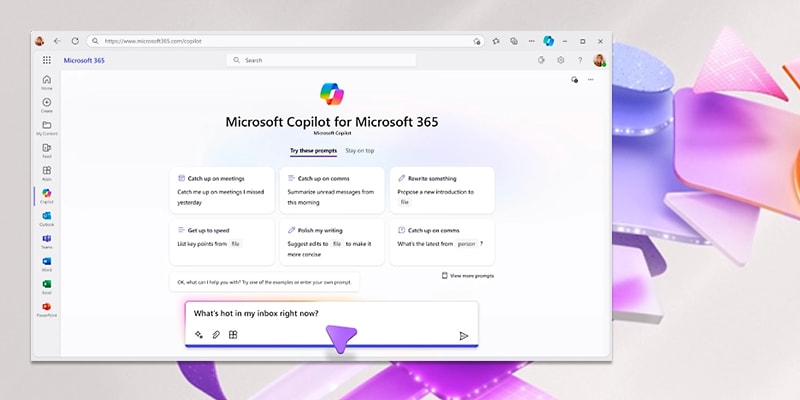
Microsoft 365 Copilot Workshop
Accelerate your AI adoption with a guided engagement designed to turn Copilot into measurable business impact. This workshop helps you identify high-value use cases, align priorities, and create a clear path to deployment. By the end, you’ll have a defined roadmap to boost productivity, streamline workflows, and enable secure, scalable adoption. The result is faster time to value, stronger user adoption, and maximized ROI from your Microsoft 365 investment.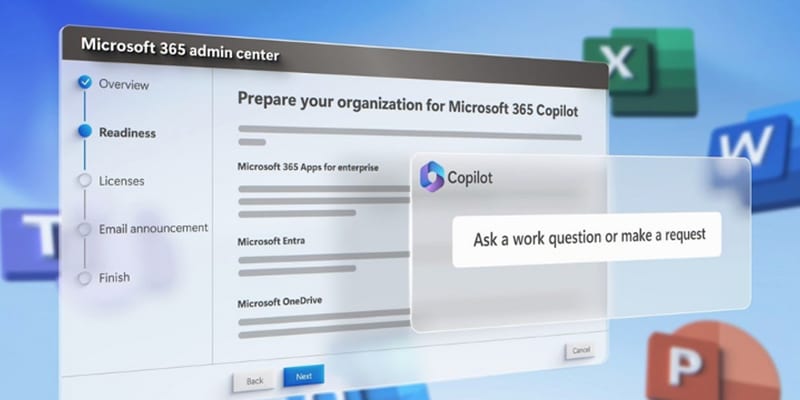
Microsoft 365 Copilot: Technical Readiness Assessment
Microsoft 365 Copilot is transforming the workplace, but success requires the right foundation. Connection helps you prepare with a comprehensive technical readiness assessment designed for a smooth, secure rollout. Our experts evaluate your environment, identify gaps, and deliver actionable recommendations. With a clear, prioritized roadmap, you can reduce risk, make informed decisions, and accelerate time to value.Use Cases Across Your Organization

- Manage Copilot deployment and performance
- Ensure security and compliance across environments
- Align licensing and infrastructure

- Protect sensitive data with built-in governance
- Monitor AI usage and risk exposure
- Maintain compliance with enterprise standards

- Automate content creation and reporting
- Gain real-time insights from business data
- Improve collaboration and productivity
Connection Achieves Technical Proficiency Across Seven Microsoft Solution Areas
Earning seven designations, Connection has been recognized as a Microsoft Solutions Partner, demonstrating our proven capabilities and technical expertise to deliver and support Microsoft services and solutions across your organization.

Connection has earned Azure Expert MSP status, uniquely qualifying us as a trusted Microsoft partner for architecting, deploying, optimizing, and managing your digital estate. We offer highly automated services and solutions to enable and support Azure environments.

Eligibility Requirements for Microsoft 365 Copilot
Microsoft 365 Copilot is available as an add-on to eligible Microsoft 365 and Office 365 plans.To get started, users must have:
- A qualifying Microsoft 365 or Office 365 base license, such as:
- Microsoft 365 E3 or E5
- Microsoft 365 Business Basic, Standard, or Premium
- Office 365 E1, E3, or E5
- A Microsoft 365 Copilot add-on license
- Microsoft Entra ID and access to core services like Exchange Online, Teams, and OneDrive
- Available for Microsoft 365 A1, A3, and A5 (eligibility may vary by user type)
Start Your Copilot Strategy with Connection
Whether you're exploring AI or accelerating deployment, Connection can help you take the next step with confidence.1 Sold separately. Customers must have a qualifying Microsoft 365 plan for enterprise or business to purchase.
2 Requires built-in camera; available effects vary by device. See Copilot+ PC FAQs
3 Live Captions translates video and audio subtitles into English from 40+ languages and from 27 languages into Chinese (Simplified). See Copilot+ PC FAQs
2 Requires built-in camera; available effects vary by device. See Copilot+ PC FAQs
3 Live Captions translates video and audio subtitles into English from 40+ languages and from 27 languages into Chinese (Simplified). See Copilot+ PC FAQs
09