AI PC Guide
How IT Leaders Should Prepare for the Next Generation of Business Devices
The PC Is Becoming Intelligent
For decades, the business PC has been treated as a productivity tool—a secure access point to applications, data, and cloud services. That assumption is now breaking down. The business PC is evolving into an AI-enabled platform capable of running intelligent automation, assistance, and real-time AI tasks directly on the device.According to Gartner, AI-capable PCs are projected to account for over 50% of all PC sales by 2026. Within one or two refresh cycles, most large organizations will no longer be deciding whether to deploy AI PCs, but how to operationalize and govern them.
AI workloads are also moving beyond the cloud. While centralized AI remains critical, cloud-only processing introduces constraints around latency, data privacy, and cost predictability at scale. Deloitte notes that even as AI processing costs decline significantly, enterprise spending continues to rise as usage expands, pushing many organizations toward hybrid models that balance cloud and on-device AI.
Together, these trends are changing how business PCs are designed, secured, and refreshed. This guide explains what defines an AI PC and provides a practical framework for assessing where, why, and how to deploy them at scale.
Together, these trends are changing how business PCs are designed, secured, and refreshed. This guide explains what defines an AI PC and provides a practical framework for assessing where, why, and how to deploy them at scale.
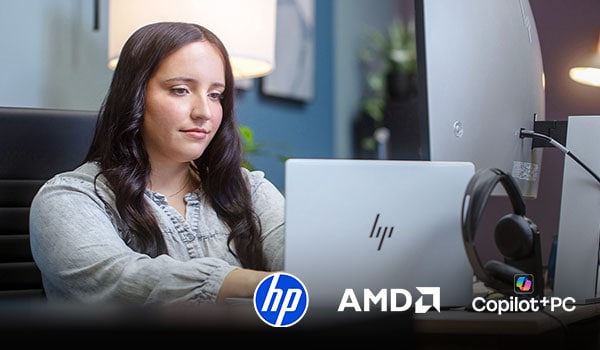
Futureproof Your Workspace with HP AMD Ryzen™ Copilot+ PCs
A new class of PCs that bring together HP’s commercial design and security, AMD Ryzen™ AI PRO performance, and Copilot+ PC experiences in Windows 11—built to help teams work faster, collaborate better, and stay protected.- Advanced language models, contextual reasoning, and intelligent assistance inside the apps you use every day
- Up to 55 TOPS NPU performance with AMD Ryzen™ AI PRO 300 Series
- Unified security from HP, AMD, and Microsoft—built for business
What Is an AI PC?
An AI PC is a business-class computer designed to run AI-powered features and applications directly on the device instead of solely through cloud services. As AI becomes embedded into productivity software, collaboration tools, and operating systems, the PC itself is evolving from a passive access point into an active participant in how work gets done.The Difference
- Traditional business laptops rely mainly on the central processing unit (CPU), with advanced AI capabilities often delivered through remote services.
- AI PCs include a neural processing unit (NPU) alongside the CPU and graphics processing unit (GPU), enabling certain AI tasks to run locally and more efficiently.
When supported, built-in AI acceleration allows features such as live transcription, background noise suppression, image enhancement, and contextual assistance to operate continuously with less risk of overloading the system or draining battery life. Rather than treating AI as an add-on, AI PCs are designed with AI processing as part of the core hardware platform.
The transition is driven by both software platforms and hardware manufacturers. Microsoft is integrating AI features directly into Windows and Microsoft 365, and chipmakers and PC vendors are embedding NPUs into next-generation business devices to support those experiences, quickly moving AI acceleration from a premium capability to a baseline expectation in commercial PC design.
The transition is driven by both software platforms and hardware manufacturers. Microsoft is integrating AI features directly into Windows and Microsoft 365, and chipmakers and PC vendors are embedding NPUs into next-generation business devices to support those experiences, quickly moving AI acceleration from a premium capability to a baseline expectation in commercial PC design.
Traditional Enterprise PC vs. AI PC
‘AI-ready’ means more than supporting a few AI features. It means the device can run approved AI experiences reliably and securely at scale, with clear expectations for performance, privacy, and manageability.
Area |
Traditional Enterprise PC |
AI PC |
|---|---|---|
| AI processing model | Advanced AI features typically delivered through cloud services | Designed to run some AI tasks on-device and still use cloud services when needed |
| Hardware architecture | CPU-focused, with limited AI-specific acceleration | CPU + GPU + dedicated NPU for AI acceleration |
| AI task performance | Performance may depend on network connectivity and cloud response | Faster local execution for supported AI features |
| Energy efficiency | Not optimized for continuous AI workloads | Optimized for sustained, low-power AI tasks when supported |
| Productivity capabilities | Standard OS and productivity tools | Integrated AI assistance and automation features |
| Security and privacy | AI processing often occurs in external services | Enables certain AI tasks to process sensitive data locally |
The Technology Behind AI PCs
AI PCs represent a new architectural baseline in how business PCs distribute processing across multiple specialized components.
For example, in AI copilot scenarios, the NPU handles continuous voice and interaction tasks, the CPU manages data access and business logic, and the GPU accelerates heavier AI workloads when required to help keep AI responsive, efficient, and scalable on the endpoint.
For example, in AI copilot scenarios, the NPU handles continuous voice and interaction tasks, the CPU manages data access and business logic, and the GPU accelerates heavier AI workloads when required to help keep AI responsive, efficient, and scalable on the endpoint.
CPU: System Control and Business Logic
- Operating system and application management
- Security policies and access controls
- General-purpose processing
GPU: High-Throughput and Parallel Processing
- Graphics and rendering
- Parallel compute workloads
- Accelerated local AI tasks for creative and technical applications
NPU: Sustained AI Acceleration
- Speech recognition
- Noise suppression
- Image and video enhancement
- Background AI features
Why NPUs Matter for Performance and Battery Efficiency
For enterprise IT teams, the NPU is the most significant architectural addition.Unlike CPUs and GPUs, which are designed for broad compute performance, NPUs are optimized for AI-related operations and high efficiency per watt so always-on AI features run in the background with less impact on system responsiveness and power draw.
For mobile workforces, this translates into:
- More consistent collaboration performance
- Reduced thermal strain
- Better battery outcomes during AI-heavy workflows
AI PC Form Factors and Deployment Scenarios
AI PCs vary by form factor, and the right choice depends on workload intensity, mobility requirements, and how consistently devices need to be standardized across a fleet.- Ultraportables and standard business laptops: Prioritize efficiency and collaboration performance for everyday productivity, especially for AI-enabled meeting and communication features
- Mobile workstations: For engineering, creative, and data-heavy users, pair an NPU with a discrete GPU for sustained performance
- Standardized mobile fleets. Focus on a small number of repeatable configurations that simplify device setup, support, lifecycle planning, and procurement while meeting baseline AI-readiness needs
- Specialty and rugged devices: For frontline and industrial environments, durability and faster response time can matter more than maximum performance, especially for vision and real-time analysis use cases
AI PC Future-proofing Checklist

Updates and support
- We know how long the maker will provide updates
- We can push those updates with our normal IT tools

Keep models simple
- We picked 2–3 standard laptop types
- Each type maps to a clear user group

Enough memory and storage
- RAM is enough for Teams + browser + security tools + AI features
- SSD storage is enough for saved files, caches, and transcripts

Protect company data
- Device encryption is on by default
- We control who can access local AI data and how long we keep it
Business Use Cases Driving AI PC Adoption
AI PCs matter most when people need help in the moment, when information is sensitive, or when the same tasks happen repeatedly throughout the day. The examples below show where on-device AI can improve responsiveness, reduce how often work needs to be sent to the cloud, and make every day work smoother.Smarter Collaboration with NPUs
When collaboration apps support the NPU, features like transcription, live captions, translation, and meeting summaries can run with less impact on the CPU and battery. Some processing can also stay on the device, which can reduce data exposure for supported features.Where AI PCs Deliver Value
Instant response
Meetings, frontline work

Private work
Documents, healthcare, finance

High-volume tasks
Everyday questions, routine tasks
Everyday Workflow Automation and Contextual Search
AI PCs can support on-device AI agents for some tasks like drafting, summarizing, scheduling, and creating routine updates, which can improve speed and responsiveness.Microsoft’s 2025 Work Trend Index reports that 82% of leaders say they’re confident they’ll use “digital labor” or AI agents to expand workforce capacity in the next 12–18 months.
Creative and Technical Workloads
For engineers, designers, and developers, AI PCs can speed up hands-on work. The GPU supports demanding technical workloads, while the NPU can handle always-on features so tasks run smoothly without sending sensitive work out to the cloud.
Frontline and Field Applications
In frontline environments, rugged or embedded AI PCs can deliver fast, reliable help on site, such as real-time quality checks, equipment monitoring, and step-by-step guidance, while maintaining secure access to company systems.
Knowledge Work Acceleration
AI PCs can speed up knowledge work by helping people find and summarize internal information faster. When supported, some search and summarization can happen on the device, which can improve responsiveness and reduce how often requests need to be sent to cloud services.
Microsoft 365 Copilot
Microsoft 365 Copilot is a powerful AI assistant that helps boost productivity and simplify everyday task. It’s built into the Microsoft 365 apps your users already use—like Outlook, Word, and Excel—offering real-time support and smart suggestions as they work. Whether they’re writing emails, creating documents, or staying on top of their calendar, Copilot helps your business get more done with less effort.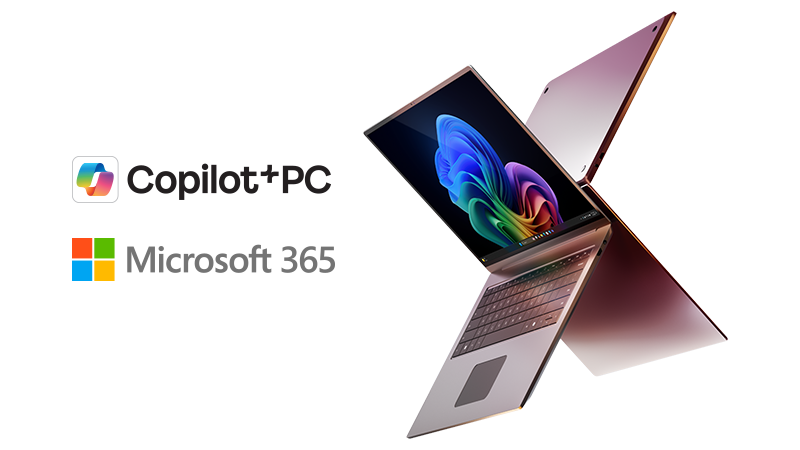
Why On-device AI Changes the Security Conversation
On-device AI moves more processing from cloud services to the device, which can reduce how much sensitive data is sent off-device and improve reliability in low-connectivity environments. It also expands what must be protected locally, including AI models and access to AI-powered tools, increasing the importance of device-level protection and sign-in requirements.Running AI locally supports privacy and compliance by keeping some processing on the device. At the same time, decentralizing AI introduces new challenges, including unmanaged AI tools, data leakage, and higher risk if compromised devices have access to critical systems.
The Shadow AI Blind Spot
Employees use AI three times more than leaders realize. This creates a ‘Shadow AI’ blind spot. Local, managed devices are the key to regaining control and reducing risk.
How to Align AI PCs with Security Strategy
Before rolling out AI PCs at scale, use this checklist to confirm access, monitoring, and auditing are in place for on-device AI features.✔ Allow only approved local AI tools and models on managed devices
✔ Require sign-in and policy controls before AI tools can take actions
✔ Give AI tools only the access they need, and remove access when it’s no longer needed
✔ Monitor AI tool use in your existing device security monitoring
✔ Record AI-driven actions so they can be reviewed and audited
Managing AI PCs Across the Enterprise
AI PCs’ on-device AI capabilities change how IT plans hardware, software, security, and cost. The goal is to support these devices at scale without adding new complexity to imaging, updates, and support.Assessing Organizational Readiness
Before investing, confirm where AI-capable hardware improves real work outcomes. Start by identifying the apps and tasks that benefit most from local AI features, and where cloud AI is still the better fit. Then prioritize roles where those features are used daily, so the first deployments deliver measurable value.Compatibility with Device Management Platforms
AI PCs should fit into your existing management stack, including Microsoft Intune and Microsoft Configuration Manager (MECM).Prioritize models that support your standard device setup, policy enforcement, and update processes—including OS, drivers, and firmware—so AI features don’t become an unmanaged exception.
Lifecycle and Complexity Management
To avoid complexity, standardize on a small number of device tiers and retire overlapping tools as AI features roll out. Define which AI features are allowed, how they’re configured, and how activity is monitored.Treat AI-related updates like any other change: test, deploy in phases, and review impact on support tickets and performance.
AI PC Purchasing Considerations for Enterprise Buyers
Buying AI PCs is not a routine refresh. AI features will evolve faster than your hardware cycle, so the goal is to standardize a small set of configurations that stay useful for the next 3–5 years without increasing support complexity.IDC forecasts that, by 2030, edge systems will make up 89% of the systems sold worldwide, pointing to more computing happening outside centralized data centers.
Key Evaluation Criteria for IT and Sourcing Teams
A consistent set of criteria makes it easier to standardize a few approved configurations, reduce exceptions, and keep support and updates predictable across the fleet.

Processor and NPU capability
Evaluate the device as a combined platform across CPU, GPU, and NPU. Prioritize NPU capability for everyday AI features, and add a discrete GPU only for roles that truly need it.

Battery life and mobility
Focus on battery performance during collaboration and multitasking, especially when AI features are enabled.

Security features and data controls
Confirm Secure Boot and a built-in security chip (TPM) are standard, along with protections that support encryption and policy enforcement.

Form factors for workforce needs
Choose standard laptops for most users, mobile workstations for demanding technical workloads, and rugged devices only where durability and on-site work require it.

Vendor and ecosystem alignment
Ensure devices align with your software stack, including Copilot+ PC experiences where relevant and your identity and management tools. Avoid models that require exceptions to your standard setup or update process.

Cost vs. value over the lifecycle
Balance unit price against expected productivity gains and how long the device remains good enough as AI features expand.

Most users
NPU-capable laptops with strong battery life

Power users
Add a discrete GPU where required
Frontline and field
Rugged devices only where durability is a must

Heavy daily AI use
Prioritize responsiveness and longevity over lowest price
Building an AI PC Adoption Roadmap
Procurement determines what you buy, while adoption determines whether AI PCs deliver value in day-to-day work. This roadmap connects roles, controls, standards, and measurement so rollout stays practical at scale.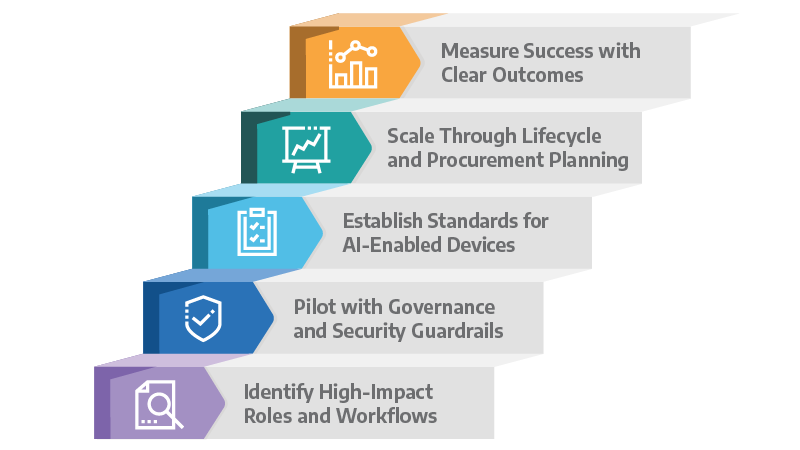
Step 1: Identify High-impact Roles and Workflows
Start with roles where slow response time, privacy requirements, or cloud costs limit productivity.
Step 2: Pilot with Governance and Security Guardrails
Use pilots to validate performance and confirm the basics are in place: sign-in rules, access limits, and monitoring.
Step 3: Establish Standards for AI-enabled Devices
Define a small set of standard device tiers based on workload needs. Use NPU-capable laptops for most users, and reserve workstations or rugged devices for specialized environments
Step 4: Scale through Lifecycle and Procurement Planning
Align purchasing and refresh cycles to role tiers, then keep policies and approved tools consistent across the fleet to prevent exceptions and sprawl.
Step 5: Measure Success with Clear Outcomes
Measure success with outcomes that matter to IT and the business. These metrics keep performance, support impact, and risk visible as you scale.
Outcome area |
What to measure |
Why it matters |
|---|---|---|
| Productivity | Task completion time, inspection speed | Shows whether AI features reduce time spent on real tasks |
| Operational quality | Error or defect reduction | Tracks improvements in frontline accuracy and consistency |
| Device efficiency | NPU utilization, battery runtime | Confirms AI features run smoothly without slowing everyday work or draining battery |
| Security posture | Reduced data egress, tool consolidation | Shows reduced exposure and better control over approved tools and data |
| User experience | Help desk tickets, downtime | Shows if the rollout is going well or creating more help desk tickets |
| Long-term value | Cloud cost reduction, resilience | Tracks whether costs stay predictable and devices remain useful over time |

Get To Know Surface Copilot+ PCs
Surface Copilot+ PCs are the most secure Windows PCs by default, bringing together powerful on-device AI and enterprise-grade protection to help safeguard your data—wherever work happens. Surface Copilot+ PCs integrate seamlessly with Microsoft Intune, Entra, and Purview, giving IT teams the controls they need while empowering employees with next-generation productivity.AI PCs Are Becoming the New Standard
Many business tools now include AI features, changing what work laptops need to handle. Laptops with a built-in NPU can run some of these features on the device to help improve responsiveness and keep some sensitive work from being sent off the laptop.New hardware alone won’t deliver results. Value comes from choosing the right devices for the right roles, setting clear rules for which AI features are allowed and where data is handled, and rolling out in stages so support and security stay manageable.
Connection is a trusted partner that can help assess readiness, standardize configurations, and buy and deploy business laptops built for on-device AI.

Integration Services
From device rollouts and refreshes to kitting, engraving, logistics, and beyond, we offer everything you need to integrate technology into your organization seamlessly and affordably. Our experts will work with you to gain a complete understanding of your unique needs and challenges, tailoring end-user solutions to meet your precise requirements.

AI PCs
A strategic leap into intelligent, secure, and adaptive computing, AI PCs deliver enhanced performance, privacy, and responsiveness. With clear guidance, smart recommendations, and intuitive navigation, this serves as an essential starting point for anyone looking to understand and choose next‑generation AI‑powered devices.
Let’s Connect!
Share your email and a Connection Expert will reach out to you during our business hours.Ready to talk about AI PCs?
Call a Connection expert today.
1.800.998.0067
15